Retrieving Images From A Nonfunctional Html Page
Retrieve images from a broken HTML page easily with these expert tips and AI tools. Optimize, manage, and ensure fast-loading images for a seamless user experience.
Learn how to recover images from broken HTML pages using various tools and techniques.
Table of Contents
Intro
Ever been on a website that looks great but some parts just don't work? Maybe the pictures are missing, things look weird, or buttons do nothing when you click them. It's annoying, right? But what if you need those missing pictures for something you're working on? Don't worry, you're not alone. Getting pictures from a broken HTML page might seem tough, but with the right tricks and tools, it's totally doable.
These days, pictures are super important for websites and how people use them. Whether you're someone who builds websites, designs them, or just really likes the internet, knowing how to get back lost or missing pictures can save you a lot of headaches. So, grab your virtual toolbox, and let's dive into how to get pictures from HTML pages that aren't working right.
What's up with broken HTML pages?
Why do HTML pages break?
Think about this: you go to a website, and instead of everything looking nice and working smoothly, you see broken pictures, text all over the place, or big blank spaces. A broken HTML page could be messed up for a bunch of reasons that stop it from showing up right. These problems could be simple coding mistakes or bigger issues with the server.
But why does this matter when you're trying to get pictures? Well, if the HTML is all messed up, finding and getting the pictures becomes harder. It's like trying to find your keys in a messy room - with the lights off!
Common reasons for pages not working
HTML pages can break for lots of reasons, like:
- Coding Mistakes: Missing bits of code, wrong syntax, or stuff in the wrong place can mess up the whole page.
- Server Problems: If the server's down or not set up right, the page might not load properly.
- Broken Links: If the links to pictures are wrong or the server with the pictures is down, they won't show up.
- Old Plugins or Scripts: Using outdated stuff can cause things to not work together, leading to broken parts on the page.
- Security Stuff: Sometimes, security settings block certain things from loading, including pictures.
Understanding these issues is the first step in figuring out how to get pictures from a broken HTML page.
How it affects getting images
When an HTML page isn't working right, getting pictures can be tricky. Broken links mean you might not be able to get to the picture directly the usual way. Also, if the page's structure is messed up, normal ways of getting pictures might not work. This is where special tools and techniques come in handy, helping you navigate the mess and get those hard-to-find pictures.
Ways to get those images back
So, how do you go about getting pictures from a broken HTML page? Let's break it down into steps you can follow.
Looking at it yourself
Sometimes, the easiest solutions are the best. Start by looking at the HTML code yourself:
- View Source Code: Right-click on the webpage and pick "View Page Source." This shows you the raw HTML code.
-
Find Image Tags: Look for
<img>tags, which usually have thesrcpart pointing to where the picture is. - Copy Image URLs: Once you've found the URLs, try opening them directly in your browser to see if they work.
Example: Let's say you find an image tag like
<img src="images/picture1.jpg" alt="Sample Image">
. By copying the
src
part, you might be able to get the picture directly, if the link isn't broken.
Pro Tip: Use your browser's search function (usually
Ctrl + F
or
Cmd + F
) to quickly find image tags in the source code.
Using your browser's tools
Modern browsers have powerful tools built in that can help you get pictures:
-
Open Developer Tools: Press
F12or right-click the page and pick "Inspect." - Go to the Network Tab: This tab shows all network requests, including pictures.
- Refresh the Page: While the Network tab is open, refresh the page to see all resource requests.
- Filter by Images: Use the filter option to show only image files.
- Download Images: Right-click on the picture you want and pick "Open in new tab" or "Save image as" to download it.
This method is really useful when pictures are loaded dynamically or through scripts that you can't see right away in the static HTML.
Trying out stuff like Img2html
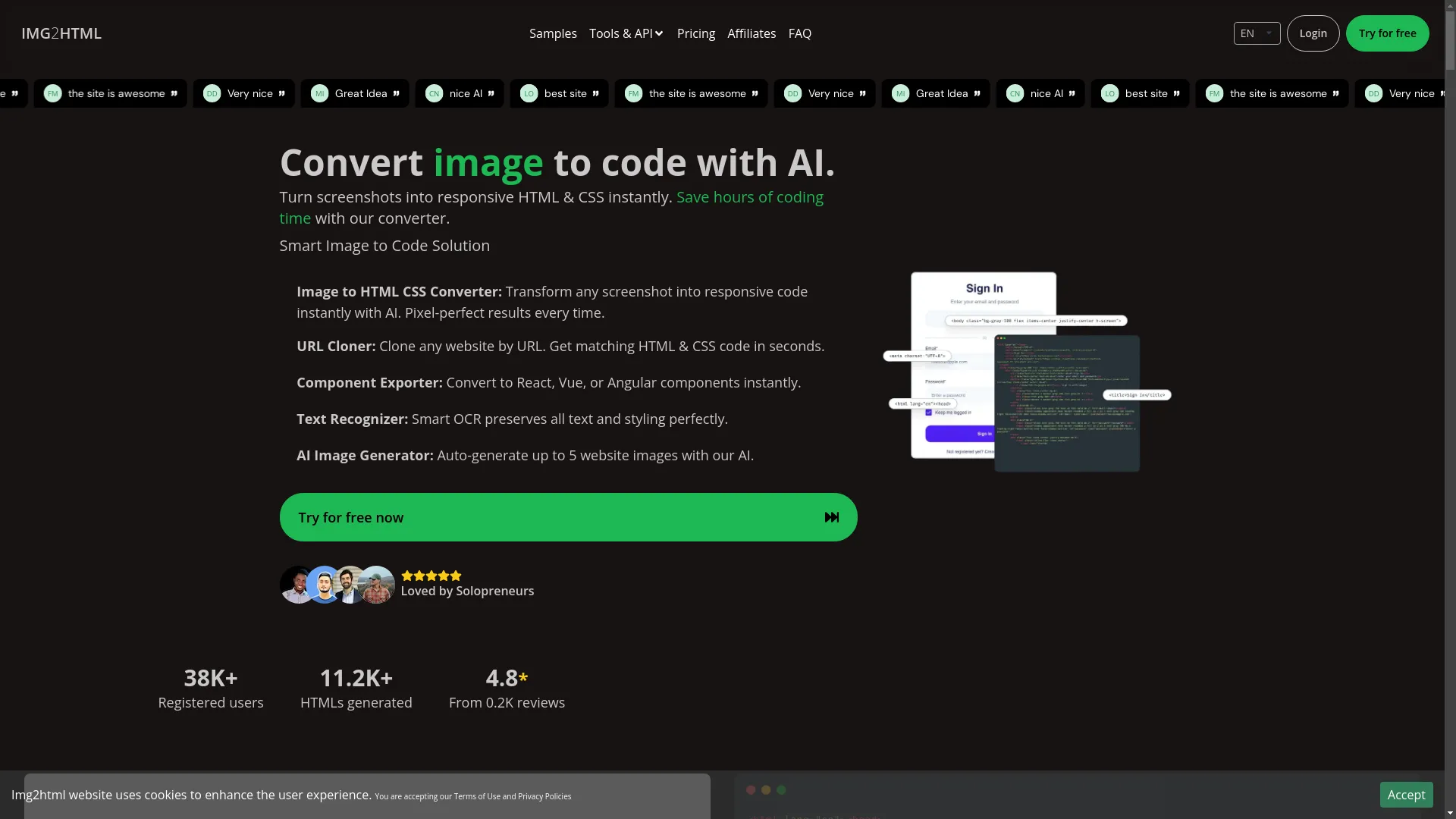
When doing it yourself doesn't work, tools like Img2html can be lifesavers. Img2html is an AI-powered platform designed to turn pictures into HTML and CSS code easily. But how does that help with getting pictures?
Well, Img2html can do the opposite too. If you have a screenshot or picture of the broken HTML page, Img2html can help you get the pictures embedded in that screenshot and turn them back into usable HTML and CSS code. This is super helpful when dealing with complex designs or when the original HTML is too messed up to work with.
Imagine this: You have a screenshot of a webpage with several pictures you need. Uploading that screenshot to Img2html can automatically find and get those pictures, saving you hours of searching manually. You can try this feature yourself at Img2html .
Advanced stuff
If the basic methods aren't working, it's time to roll up your sleeves and try some more advanced techniques.
Using tools to grab data automatically
Web scraping involves using software to automatically get data from websites. Tools like Beautiful Soup (for Python) or Selenium can help you dig deeper into the webpage structure to find and download pictures.
Steps to Scrape Images:
- Set Up Your Environment: Install necessary libraries like Beautiful Soup and Requests in Python.
- Fetch the Webpage: Use Python scripts to get the HTML content of the page.
-
Parse the HTML: Use Beautiful Soup to go through the HTML and find all
<img>tags. -
Extract and Download Images: Collect the
srcparts and download the pictures using Python scripts.
Example Code Snippet:
import requests
from bs4 import BeautifulSoup
import os

url = 'http://example.com/broken-page.html'
response = requests.get(url)
soup = BeautifulSoup(response.text, 'html.parser')

img_tags = soup.find_all('img')
image_urls = [img['src'] for img in img_tags]

os.makedirs('images', exist_ok=True)

for img_url in image_urls:
    img_response = requests.get(img_url)
    img_name = img_url.split('/')[-1]
    with open(f'images/{img_name}', 'wb') as f:
        f.write(img_response.content)
Note: Always make sure you have permission to scrape and download content from websites to avoid legal issues.
AI-powered converters
Artificial Intelligence is changing a lot of things, including web development. Tools like Img2html use AI to understand and convert pictures into usable code. But beyond conversion, AI can help in getting pictures by analyzing patterns, predicting where pictures should be, and even fixing broken elements.
Benefits of AI in Getting Pictures:
- Efficiency: AI can process and get pictures faster than doing it manually.
- Accuracy: With machine learning algorithms, AI can tell different types of pictures apart and get them more accurately.
- Smart Fixes: AI can try to rebuild missing or broken picture links based on available data.
Imagine having an AI assistant that not only gets the pictures you need but also suggests ways to make them work better. That's the power of using AI to get pictures.
Tools and tech
To effectively get pictures from a broken HTML page, having the right tools is crucial. Let's look at some of the best tools and technologies available.
What's Img2html all about?
Img2html is an innovative AI-powered platform designed to bridge the gap between pictures and code. By turning pictures into responsive HTML and CSS effortlessly, Img2html makes web development easier, saving developers lots of time they'd spend coding manually.
Key Features:
- Picture to HTML & CSS Conversion: Turn any screenshot into semantic, responsive code in seconds.
- URL Cloner: Clone entire websites and get matching HTML and CSS code quickly.
- Component Exporter: Convert designs into React, Vue, or Angular components seamlessly.
- AI Picture Generator: Create high-quality website pictures using AI.
Why Img2html?
Imagine if you could take a picture of any webpage and instantly get the clean, working code behind it. That's what Img2html offers, making it an essential tool for developers, designers, and even marketers.
How Img2html can help you get images
When dealing with a broken HTML page, Img2html can make getting pictures easier in several ways:
- Reverse Engineering: Upload a screenshot of the broken page, and Img2html can analyze and get the pictures, converting them into usable formats.
- Code Optimization: Once pictures are retrieved, Img2html can help you optimize where they go and how they fit into new or fixed HTML structures.
- Framework Support: Whether you're using React, Vue, or Angular, Img2html makes sure that the pictures you get fit seamlessly into your chosen framework.
Basically, Img2html acts as both a detective and an engineer, uncovering hidden pictures and giving you the tools to put them back into your projects effectively.
Best ways to handle images
Getting pictures from a broken HTML page is just one part of the puzzle. Making sure your pictures are well-managed and optimized can prevent future headaches and make your website work better.
Making images work better online
Why Optimize?
Big, unoptimized pictures can slow down your website, making it less enjoyable for users and hurting your search engine rankings. Optimized pictures ensure faster load times and better performance across devices.
How to Optimize Images:
- Choose the Right Format: Use JPEG for photographs, PNG for pictures that need transparency, and SVG for scalable graphics.
- Compress Images: Tools like TinyPNG or ImageOptim can make file sizes smaller without making the pictures look worse.
-
Use Responsive Images: Use
srcsetandsizesattributes to serve different picture sizes based on the user's device. - Lazy Loading: Delay loading pictures until they're about to be seen, making the initial page load faster.
Personal Story: I once had a website where the pictures took forever to load. After optimizing them, not only did the site speed up, but more people started using it too. It's a win-win!
Keeping backups and tracking changes
The Importance of Backups
Imagine losing a month's worth of work because you didn't back up your pictures. Nightmare, right? Regular backups ensure that your pictures are safe from accidental deletions, server crashes, or hacking attempts.
Implementing Version Control:
- Use Cloud Storage: Services like Google Drive, Dropbox, or AWS S3 offer reliable storage solutions.
- Version Control Systems: Tools like Git can help track changes and manage different versions of your pictures and code.
- Automated Backups: Set up automated backup routines to ensure your pictures are consistently backed up without you having to do it manually.
Pro Tip: Use multiple backup methods for maximum security. For instance, use both cloud storage and local backups to cover all your bases.
Making things better for users
Pictures are more than just decorative elements; they play a big role in shaping how users experience your website. Making sure pictures are accessible, optimized, and well-integrated can significantly improve how users interact with your site.
Why images matter for user experience
Pictures can:
- Convey Information: Infographics, charts, and diagrams can make complex information easier to understand.
- Engage Users: High-quality visuals grab attention and keep users interested.
- Enhance Aesthetics: Well-chosen pictures contribute to the overall look and feel of your website, making it more appealing.
Question to think about: Have you ever visited a site where the pictures were so captivating that you couldn't look away? That's the power of good picture usage in user experience.
Making sure images work for everyone and load fast
Accessibility Matters
Not all users can see pictures, whether due to visual impairments or using text-based browsers. Making sure pictures are accessible improves inclusivity and user satisfaction.
How to Enhance Accessibility:
-
Alt Text: Always include descriptive
altattributes for pictures. This helps screen readers convey the content to visually impaired users. - Captioning: Provide captions for pictures when necessary to offer additional context.
- Avoiding Text in Images: Whenever possible, use actual text instead of embedding text within pictures. This ensures readability across all devices and accessibility for screen readers.
Performance Optimization
As mentioned earlier, optimized pictures make pages load faster, but it's equally important to balance quality and performance.
Strategies for Performance:
- Use Content Delivery Networks (CDNs): CDNs like Cloudflare or Akamai can serve pictures from servers closest to the user, reducing load times.
- Implement Caching: Browser caching can store pictures locally on a user's device, speeding up subsequent visits.
- Minimize HTTP Requests: Combine pictures using techniques like CSS sprites to reduce the number of server requests.
Personal Opinion: Spending time optimizing pictures not only makes your site perform better but also shows users that you care about their experience.
Real-life examples
Nothing shows the importance of effective picture retrieval and management better than real-world examples. Let's look at how these strategies play out in practice.
A story about fixing a broken page
Scenario:
Imagine you're a developer maintaining an old website. One day, you discover that several important pictures on the homepage aren't loading. The HTML page shows broken picture icons, and users are complaining about how the site looks.
Steps Taken:
- Looking at it yourself: You start by checking the source code and find that the picture URLs are pointing to an old server that's no longer active.
- Using Developer Tools: By opening the browser's developer tools, you see that the pictures are failing to load due to 404 errors.
- Using tools to grab data automatically: You run a scraping script to try getting any available picture data, but with limited success since the server isn't responding.
- Trying out Img2html: Frustrated, you decide to take a screenshot of the broken page and upload it to Img2html. The tool efficiently gets the pictures embedded within the screenshot.
- Putting it back together: Using Img2html's conversion features, you generate the necessary HTML and CSS code to put the pictures back into the fixed HTML structure.
Outcome:
Within a few hours, the homepage is back to looking great, with all pictures restored. Users are happy, and the website's working properly again.
Lesson Learned:
Combining manual methods with advanced tools like Img2html can effectively solve even the toughest picture retrieval issues.
What's coming next
The world of web development is always changing, and staying ahead of the curve can give you a big advantage. Here's a peek into the future of picture retrieval and management.
AI and machine learning in web stuff
Artificial Intelligence is set to further revolutionize web development. From automating boring tasks to enhancing creative processes, AI's role is expanding.
Potential Advancements:
- Smart Picture Recognition: Improved algorithms for better picture detection and extraction from complex sites.
- Predictive Coding: AI that anticipates design patterns and helps in code generation.
- Enhanced Security: AI-driven tools that can detect and fix vulnerabilities in HTML code, preventing future picture retrieval issues.
Analogy: Think of AI as your personal web development assistant, tirelessly working behind the scenes to make your projects smoother and more efficient.
New tools for getting images back
As technology advances, new tools are emerging to address the challenges of picture retrieval more effectively.
What's on the Horizon:
- Enhanced AI Converters: Tools like Img2html will continue to evolve, offering even more accurate and efficient picture extraction features.
- Integrated Development Environments (IDEs): Future IDEs might include built-in tools for automatic picture retrieval and optimization.
- Blockchain for Picture Security: Ensuring the integrity and authenticity of pictures through blockchain technology could become a standard practice.
Funny thought: Imagine a future where your IDE not only writes your code but also fetches the pictures you forgot to include. Now, that's a developer's dream come true!

Wrapping it up
Getting pictures from a broken HTML page might seem like a huge task, but with the right strategies and tools, it's totally doable. From looking at it yourself and using browser developer tools to leveraging advanced AI-powered platforms like Img2html, you have lots of options to choose from.
Remember, effective picture management doesn't just solve immediate problems—it also makes your website perform better, improves user experience, and makes everything work better overall. As technology keeps advancing, embracing these tools and practices will ensure you stay ahead in the competitive world of web development.
So, the next time you come across a broken HTML page, don't panic. Arm yourself with these strategies, explore the tools available, and turn that frustration into an opportunity to make things better. Happy coding!