Achieving Aesthetic Html Code Tips And Tricks
Enhance your HTML aesthetics with our expert tips and tricks. Learn how to create tidy, efficient code that boosts user experience and speed.
Making Your HTML Look Good: Tips and Tricks
What's Inside
- Let's Get Started
- What Makes HTML Look Good?
- Key Things to Remember for Good-Looking HTML
- Cool Tools to Help You Out
- What's Hot in HTML Design Right Now
- Next-Level Tricks for Better-Looking HTML
- Making Friends and Staying in the Loop
- Why User Experience and Speed Matter
- Wrapping It Up
- What Now?
Let's Get Started
Hey there, web builders and wannabe coders! Ever looked at a super cool website and thought, "How the heck did they do that?" Well, you're in luck. Today, we're gonna talk about how to make your HTML code look awesome. Whether you've been coding for ages or you're just starting out, these tips and tricks will help you level up your skills.
In the world of web stuff, making your HTML look good isn't just about making things pretty - it's about making websites that work great, load fast, and stand out from the crowd. So grab a drink, get comfy, and let's dive into this coding adventure together!
What Makes HTML Look Good?
Before we get into the nitty-gritty, let's talk about what we mean by "good-looking HTML." Basically, it's about writing clean, efficient code that not only looks nice but also works smoothly. It's like finding the sweet spot between being creative and practical, making sure your website looks great and does its job well.
Think of it like building a house. Good-looking HTML is like the blueprint that decides how everything's laid out and how it all looks. Just like a well-designed building catches your eye and works well, good HTML code makes your website easy to use and run smoothly.
Key Things to Remember for Good-Looking HTML
Making your HTML look good isn't a one-size-fits-all thing. There are a few important rules to follow that'll help you write better code. Let's check 'em out.
Keep It Tidy
Ever walked into a messy room and felt overwhelmed? Same goes for your code. Keeping your HTML neat and organized makes it easier to read, fix, and grow. Here are some tips:
- Spacing Matters: Use spaces or tabs to show which parts of your code go together. It makes a big difference in how easy it is to read.
<div class="container">
    <header>
        <h1>Welcome to My Site</h1>
    </header>
    <main>
        <section>
            <p>This is a cool section.</p>
        </section>
    </main>
    <footer>
        <p>© 2024 My Site</p>
    </footer>
</div>
- Name Things the Same Way: Whether you like using dashes, underscores, or camelCase for your classes and IDs, stick with one style throughout your project.
- Break It Down: Split your code into reusable bits. It saves time and keeps things consistent across your site.
Use the Right Tags
Using the right HTML tags gives your code meaning, making it easier to understand and use. Instead of using
div
for everything, use tags that describe what's inside them.
-
Pick the Right Tag:
Use tags like
<header>,<nav>,<article>,<section>, and<footer>to show how your webpage is structured.
<article>
    <h2>What Are the Right Tags?</h2>
    <p>Using the right tags helps with...</p>
</article>
- Make It Accessible: Screen readers and other tools that help people with disabilities use your site rely on these tags to understand and navigate your website.
Stick to One Way of Doing Things
Being consistent in how you write your code makes it easier to understand and work with others.
- Follow the Rules: Use a style guide, like the one Google has for HTML/CSS. It gives you standard rules for writing and formatting your code.
- Use Checking Tools: Tools like ESLint or HTMLHint can automatically check if your code is consistent and point out any issues.
- Keep Track of Changes: Use something like Git to keep track of changes and work well with others.
Cool Tools to Help You Out
These days, there are tons of tools that can help you write good-looking HTML code. Let's look at some must-haves for your toolkit.
AI Code Makers
Imagine having a helper that can turn your ideas into code instantly. That's what AI code makers like Img2HTML do. They use smart computer brains to turn pictures or screenshots into clean HTML and CSS code in seconds.
Why Use AI Code Makers?
- Fast: Turn designs into code way quicker, saving you hours of typing.
- Spot-On: Get pixel-perfect results with hardly any mistakes.
- Works on All Screens: Makes sure your code looks good on phones, tablets, and computers without extra work.
For Example: With Img2HTML, you can take a picture of a website and turn it into HTML & CSS right away. It even works with fancy stuff like Tailwind CSS, React, Vue, and Angular. It's super helpful for developers who want to work faster.
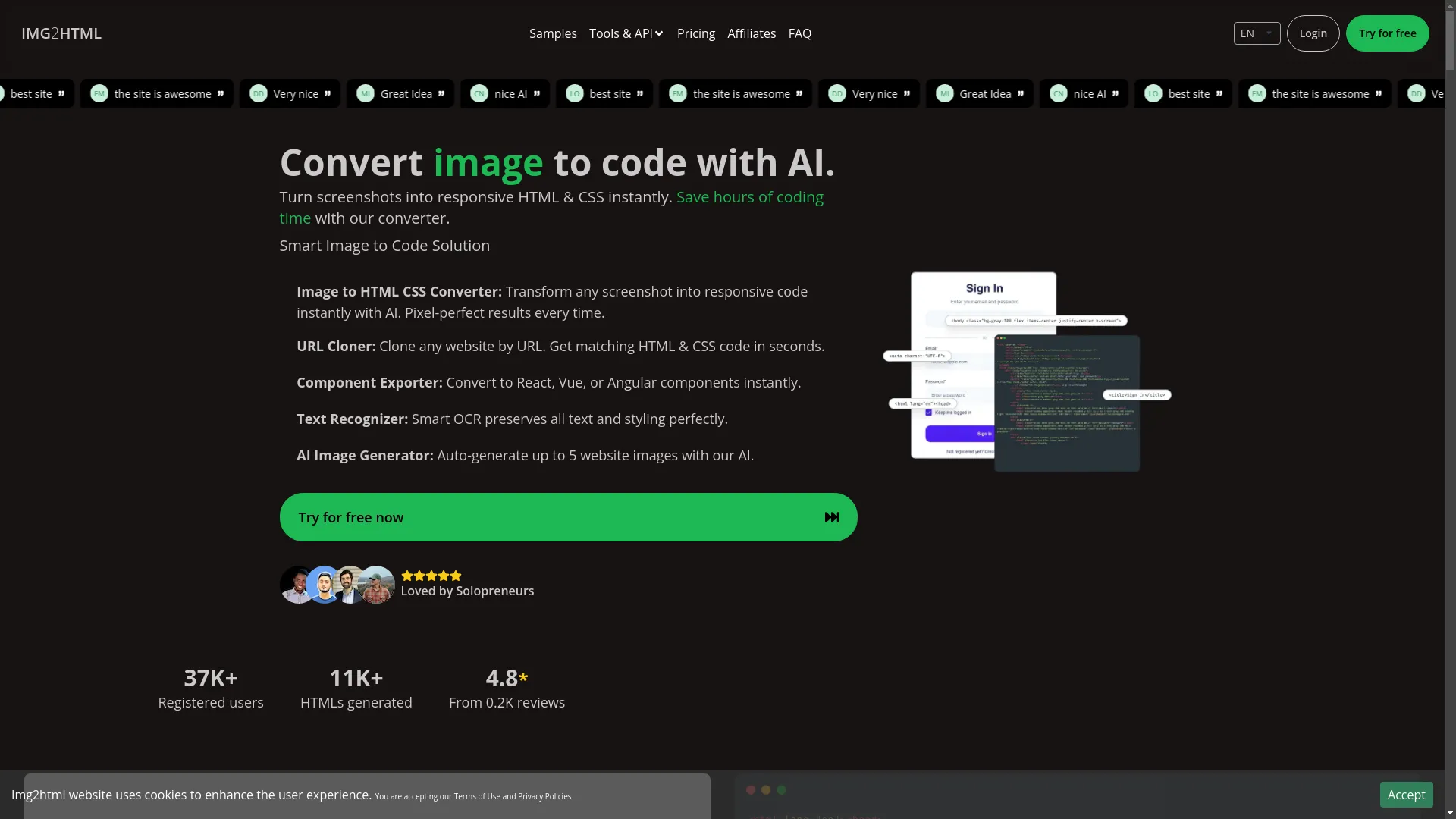 You can try this feature yourself at Img2HTML
Code Editors and Add-ons
A good code editor can make coding way easier. Here are some top picks:
- Visual Studio Code (VS Code): You can customize it a lot and add tons of extra features.
- Sublime Text: Known for being fast and simple.
- Atom: Free to use and you can change it however you want.
Must-Have Add-ons:
- Prettier: Automatically makes your code look neat and tidy.
- Emmet: Helps you write HTML & CSS faster with shortcuts.
- Live Server: See your changes right away without having to refresh the page.
CSS Helpers
CSS helpers give you pre-written CSS classes that help you make good-looking layouts quickly.
- Bootstrap: Super popular, with lots of ready-to-use parts.
- Tailwind CSS: Lets you customize your design a lot with little bits of CSS.
- Bulma: A modern CSS helper that's based on Flexbox.
Pro Tip: Try using Tailwind CSS with AI tools like Img2HTML to make your work even faster and your designs even better.
What's Hot in HTML Design Right Now
Keeping up with the latest trends helps make sure your websites look modern and are easy to use. Here are some current trends in HTML design.
Simple Designs
Less is more. Simple designs focus on keeping things clean, using lots of white space, straight lines, and not too many colors to make websites look good.
- Why It's Good: Makes things easier to read, loads faster, and is nicer to use.
- How to Do It: Use simple colors, don't add stuff you don't need, and focus on what's important.
Dark Mode
Dark mode is getting really popular because it looks cool and is easier on your eyes, especially when it's dark.
Tips for Making It:
- Use CSS variables to easily switch between light and dark themes.
- Make sure there's enough contrast so everything's easy to read.
:root {
    --bg-color: #ffffff;
    --text-color: #000000;
}

[data-theme="dark"] {
    --bg-color: #121212;
    --text-color: #ffffff;
}

body {
    background-color: var(--bg-color);
    color: var(--text-color);
}
Text That Looks Good on All Screens
Text that changes size smoothly on different devices makes things look better and easier to read.
How to Do It:
-
Use relative sizes like
emorreminstead of fixed sizes likepx. - Make your text size change based on how big the screen is.
html {
    font-size: 16px;
}

@media (max-width: 600px) {
    html {
        font-size: 14px;
    }
}
Little Animations
Small animations and interactive bits make your site more fun to use without being too much.
- Examples: Buttons that change when you hover over them, loading animations, and forms that show if you've filled them out right.
- Tools to Use: CSS animations, JavaScript libraries like GSAP.
Next-Level Tricks for Better-Looking HTML
Ready to make your HTML even better? Let's look at some advanced tricks that'll make your code not just good, but great.
Make It Work on All Screens
With everyone using different devices, your website needs to look good on computers, tablets, and phones.
Flexible Layouts:
Use percentages for widths to make layouts that adjust.
.container {
    width: 80%;
    margin: 0 auto;
}
Adjust for Different Screens:
Change styles based on the device's screen size.
@media (max-width: 768px) {
    .navbar {
        flex-direction: column;
    }
}
Flexible Images:
Use CSS like
max-width: 100%
to make sure images fit right.
Speed It Up
Good-looking code is great, but a slow website can ruin everything. Make your HTML fast to ensure quick loading and smooth use.
- Fewer Requests: Don't load too many things on your page.
- Smaller Images: Make images smaller without making them look bad using tools like ImageOptim or TinyPNG.
- Load Some Stuff Later: Load less important JavaScript files later so they don't slow down your page.
<script src="script.js" async></script>
Make It Easy for Everyone to Use
Making your HTML look good isn't just about looks - it's about making sure everyone can use your website.
- Use Special Tags: Add ARIA roles to make your HTML even more understandable.
- Keyboard Friendly: Make sure people can use everything on your site with just a keyboard.
- Describe Images: Add descriptions to all images to help people who use screen readers.
<img src="logo.png" alt="WEB:img2html.com">
- Easy to Read: Make sure text and background colors are easy to see and read.
Making Friends and Staying in the Loop
Web stuff changes all the time, so it's important to stay connected with other people who do this too.
- Join Groups: Talk to other developers on places like Stack Overflow , Reddit's r/webdev , and GitHub to get help and share what you know.
- Watch Online Talks: Stay up to date with new stuff by watching online events.
- Follow Cool Developers: Connect with smart people on Twitter and LinkedIn .
Personal Story: I once went to a local meetup for web developers and met some really cool people. Not only did I learn a lot, but I also found people to work with on some projects. Meeting people can open doors you didn't even know were there!

Why User Experience and Speed Matter
Making your HTML look good is closely tied to making your website nice to use. Let's see how these things work together.
User Experience (UX)
UX is about how people use your website. Good-looking HTML makes your site easier and more fun to use.
- Easy to Get Around: Make sure people can find what they're looking for easily.
- Important Stuff Stands Out: Use size, color, and spacing to show what's important.
- Show What's Happening: Let people know when something happens, like when they click a button or send a form.
Speed Checks
Checking how fast your website is helps you understand how well it's working and where you can make it better.
- How Fast It Loads: Try to make your site load in less than 3 seconds to keep people interested.
- First Byte Speed: Check how quickly the browser gets the first bit of your website.
- Stuff Not Moving Around: Make sure things don't jump around as the page loads.
Tools You Can Use:
- Google Lighthouse : Checks how fast, accessible, and SEO-friendly your site is.
- GTmetrix : Gives you detailed info on how fast your site is and how to make it better.
- WebPageTest : Test how your website works from different places and on different devices.
Wrapping It Up
Making your HTML look good is both an art and a science. It's about writing clean, organized code while using the latest tools and trends to make your website look great and work well. By following the main rules, using helpful tools like AI code makers, and keeping up with new trends, you can create websites that not only look amazing but also give people a great experience when they use them.
Remember, getting really good at HTML is an ongoing process. Keep learning, stay curious, and don't be afraid to try new things and technologies.
What Now?
Ready to make your HTML coding even better? Start using these tips and tricks in your next project and see how much better it looks. Need a little help? Check out tools like Img2HTML to make your work easier and generate clean, responsive code quickly. Don't forget to share what you learn and talk with other developers in your community. Happy coding!