Using Html Data For Crossword Clues
Unlock creativity in crossword creation with HTML data. Learn to transform web content into engaging clues using tools like Img2html and web scraping.
Table of Contents
- Introduction
- Why Use HTML Data for Crossword Clues?
- Extracting Meaningful Data from HTML
- Transforming HTML Data into Engaging Clues
- Leveraging AI Tools like Img2html
- Best Practices for Using HTML Data in Crosswords
- Overcoming Common Challenges
- Real-World Applications and Examples
- Future Trends: The Intersection of AI and Crossword Creation
- Conclusion
Introduction
Ever been stuck on a crossword, racking your brain for that one tricky clue? What if I told you the answers might be hiding in plain sight, buried in the HTML of websites you visit every day? Crazy, right? In our digital world, using HTML data to come up with crossword clues isn't just a neat trick - it's a cool way to mix tech and wordplay.
Whether you're a crossword junkie looking to spice things up or a coder wanting to make something fun, using HTML for crossword clues opens up a whole new world. So grab a coffee and let's dive into this weird and wonderful mashup of web stuff and word games!

Why Use HTML Data for Crossword Clues?
You might be thinking, "Why HTML?" Fair question! HTML is the backbone of every webpage you see. It's got all the good stuff - headlines, paragraphs, pictures, links. It's like a goldmine of potential clues just waiting to be dug up.
Endless Content Reservoir
Think about it - every website is packed with info. Blog posts, product descriptions, user reviews - HTML data's got it all. It's perfect for coming up with creative and challenging crossword clues.
Dynamic and Up-to-Date
Websites are always changing, always fresh. Unlike old books or magazines, HTML data can give you new stuff every day, keeping your crosswords current and interesting.
Diverse Sources
From tech gadgets to cooking to history and pop culture, websites cover everything. That means you can make crosswords for all kinds of interests and skill levels.
Extracting Meaningful Data from HTML
So how do you go from HTML code to crossword clues? It's all about pulling out the good stuff and turning it into something usable. Let's break it down.
Web Scraping Basics
Web scraping is just a fancy way of saying "automatically grabbing data from websites." You look at the HTML and pull out the text that could make good clues.
Quick Tip:
Always make sure it's okay to scrape a website's data. Check their rules (usually in a file called
robots.txt
) to avoid getting into trouble.
Tools You Need
- Beautiful Soup (Python): A cool tool for pulling data out of HTML files.
- Scrapy: Another open-source thing for grabbing data.
- Img2html: This one's mainly for turning pictures into code, but it can help turn visual stuff into HTML that you can then use for clues.
Transforming HTML Data into Engaging Clues
Getting the data is just step one. The real fun is turning that data into awesome crossword clues.
Identifying Key Elements
Start by looking for the juicy bits in the HTML. Headlines, paragraphs, and lists are usually goldmines for potential clues.
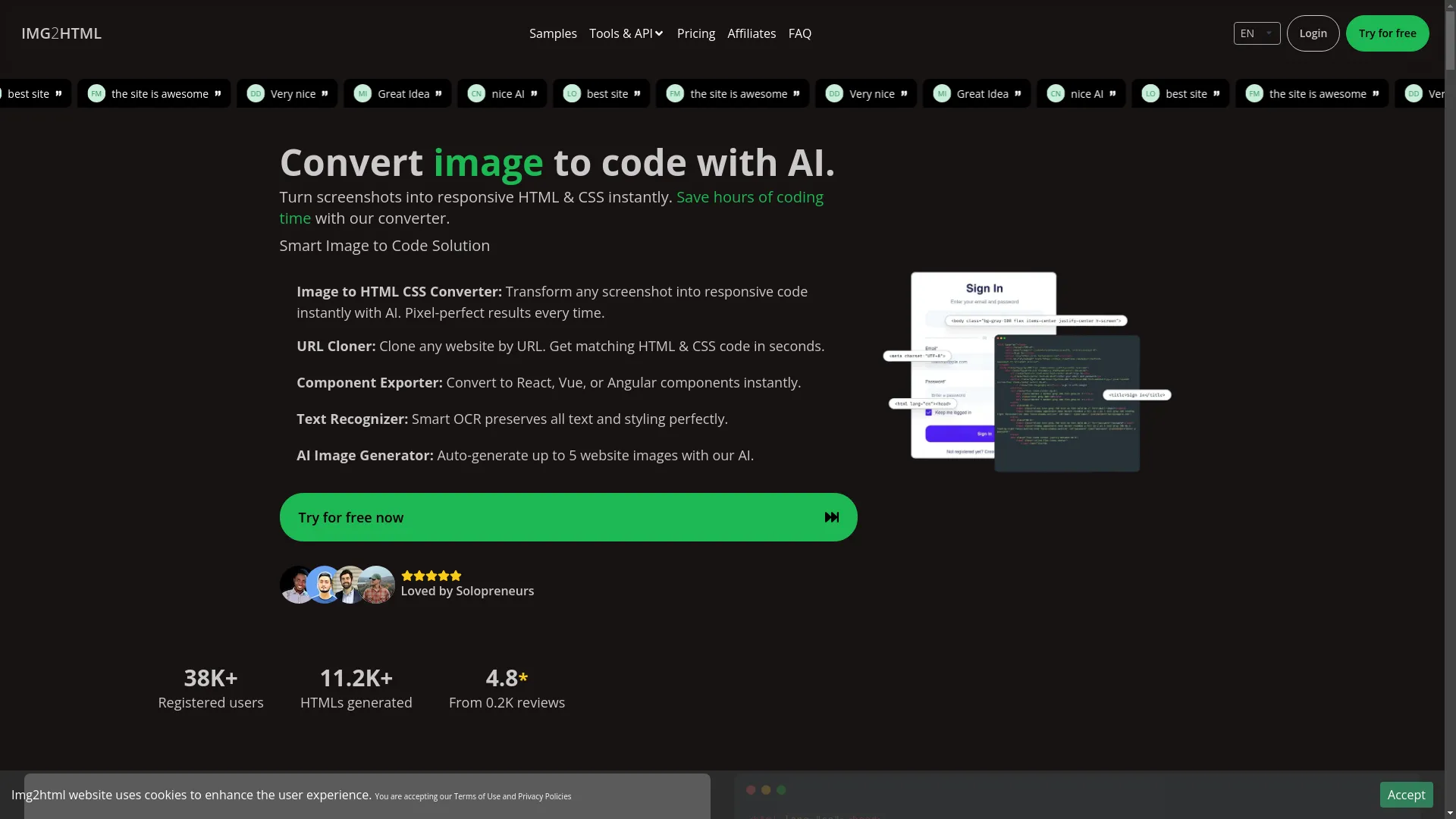
<h1>Convert image to code with AI.</h1>
<p>Turn screenshots into responsive HTML & CSS instantly. Save hours of coding time with our converter.</p>
Stuff like "Convert image to code with AI" and "responsive HTML & CSS" could make great clues about tech and design.
Creating Clues from Content
Once you've found the good stuff, it's time to make your clues. Try to be clear, creative, and a bit challenging.
-
Clue:
"AI thing that turns pictures into web code"
Answer: Img2html -
Clue:
"Makes websites look good on phones, along with HTML"
Answer: CSS
Personal Story: The first time I tried making crossword clues from a website, I found a sentence like "Best site for AI-generated code." I turned it into, "Top place for AI-helped coding," with the answer being Img2html. My friends loved it!

Leveraging AI Tools like Img2html
Now let's talk about Img2html - a tool that can really change the game here.
What is Img2html?
Img2html is this cool AI thing that turns pictures into clean HTML and CSS code. It makes web development way easier by turning screenshots or designs into actual web pages.
How Img2html Can Enhance Crossword Creation
While Img2html is mainly for turning images into code, we can use it in some clever ways to help make crossword clues.
- Visual Clues Extraction: Use Img2html to turn website screenshots into HTML. This makes it easier to grab text that can become clues.
- Component Identification: If a website has specific parts (like menus or footers), Img2html can help isolate these, giving you clues about web design stuff.
- Efficiency Boost: By automating the conversion, you save time and can focus more on making creative clues.
Funny Thought: Imagine telling your friends, "I got all my crossword clues from AI-converted HTML. I'm not just good at puzzles - I'm basically a tech wizard now!"
You can try this feature yourself at Img2htmlBest Practices for Using HTML Data in Crosswords
To make sure your crosswords are fun and accurate, follow these tips:
Ensure Accuracy
Double-check the data you grab to avoid typos or old info.
Maintain Clarity
Keep clues clear and simple. Don't use complicated language unless you're making puzzles for experts.
Balance Difficulty
Mix easy and hard clues. Not everyone's a tech genius or a word whiz.
Respect Copyright
Only use content you're allowed to. Don't copy stuff that could get you in legal trouble.
Overcoming Common Challenges
Using HTML data for crosswords isn't always easy. Here's how to deal with some common problems:
Dealing with Unstructured Data
Websites can be messy with nested stuff everywhere. Use good tools like Beautiful Soup to pull out the text you need.
Handling Dynamic Content
Some website content might not show up in the initial HTML. Tools like Selenium can help you see everything, even the hidden stuff.
Avoiding Redundancy
Make sure you're not using the same data over and over. Filter out repeated phrases or boring text that won't make good clues.
Real-World Applications and Examples
Let's look at some cool ways to use HTML data for crossword clues:
Educational Platforms
Teachers could grab stuff from educational websites to make subject-specific crosswords. Like, a biology class might use clues about the human body from a science site.
Tech Blogs
Use content from tech blogs like Img2html's website to make puzzles about web development, AI tools, and modern design.
-
Clue:
"AI thing that turns pictures into HTML"
Answer: Img2html
Marketing Campaigns
Companies could make themed crosswords using their website content. It's fun for customers and helps them remember the brand.

Future Trends: The Intersection of AI and Crossword Creation
The mix of AI and crosswords is just getting started. Here's what might happen:
Enhanced Clue Generation
AI could look at tons of HTML data to make really good, context-aware clues, taking what humans do to a whole new level.
Personalized Puzzles
Imagine crosswords made just for you, using topics from your browsing history to create custom puzzles.
Interactive Crosswords
With new web tech, crosswords could become interactive experiences, using multimedia clues straight from HTML content.
Food for Thought: Isn't it wild to think that just browsing the web could turn into fun brain teasers?

Conclusion
Using HTML data for crossword clues is a cool example of how modern tech can make old-school games even better. By tapping into the rich content of websites, especially with tools like Img2html, you can make crosswords that are challenging, fun, and totally up-to-date.
So next time you're stuck on a crossword, why not check out the HTML of your favorite websites? You might find the perfect clue or even inspire a whole new set of puzzles to keep you and your friends entertained for hours.
Ready to take your crossword game to the next level? Start exploring HTML data today and watch your creativity soar!

Happy puzzling!