The Pros And Cons Of Image2Codeai Which Tool Is More Versatile
Explore the versatility of Image2CodeAI tools. Discover their pros and cons, and find the best AI solution for transforming images into functional code.
Introduction
Hey there! Ever looked at a gorgeous website design and thought, "Dang, I wish I could just snap my fingers and turn this into actual code"? If you've done any web design or development, you know exactly what I'm talking about. Coding from scratch can be a real pain sometimes. That's where Image2CodeAI comes in - it's this cool new tool that's shaking things up by turning images into working code using AI.
Imagine uploading a screenshot of your design and boom! You get clean, responsive HTML and CSS code in seconds! Sounds like magic, right? Well, it's not magic - it's just really smart AI. But like any tool, Image2CodeAI has its ups and downs. So, which tool is the most versatile? Let's dig in and check out what's out there in the world of Image2CodeAI tools to help you find the perfect fit for what you need.
Understanding Image2CodeAI
What is Image2CodeAI?
Image2CodeAI is basically a fancy name for AI-powered tools that can take images (usually of web designs or UI mockups) and turn them into actual code like HTML, CSS, JavaScript, or even stuff for frameworks like React, Vue, or Angular. These tools use machine learning to figure out what's in an image and spit out code that web developers can use right away.
How Does It Work?
At its core, Image2CodeAI uses some pretty advanced computer vision tech to look at the uploaded image. Here's a simple breakdown of how it goes:
- Image Upload: You upload a picture of your design or a screenshot of a webpage.
- Element Recognition: The AI looks at the image and figures out what's what - like headers, buttons, images, and text boxes.
- Code Generation: Based on what it sees, the AI writes the HTML and CSS code. Some of the fancier tools can even do JavaScript or stuff for specific frameworks.
- Output Review: You get the code it made, which you can then look over, tweak, and use in your project.
It's like having a super-smart assistant who can read your mind and turn your visual ideas into code in no time!
Top Image2CodeAI Tools in the Market
There are quite a few Image2CodeAI tools out there, each with its own cool features. Let's take a closer look at some of the big players.
Img2html
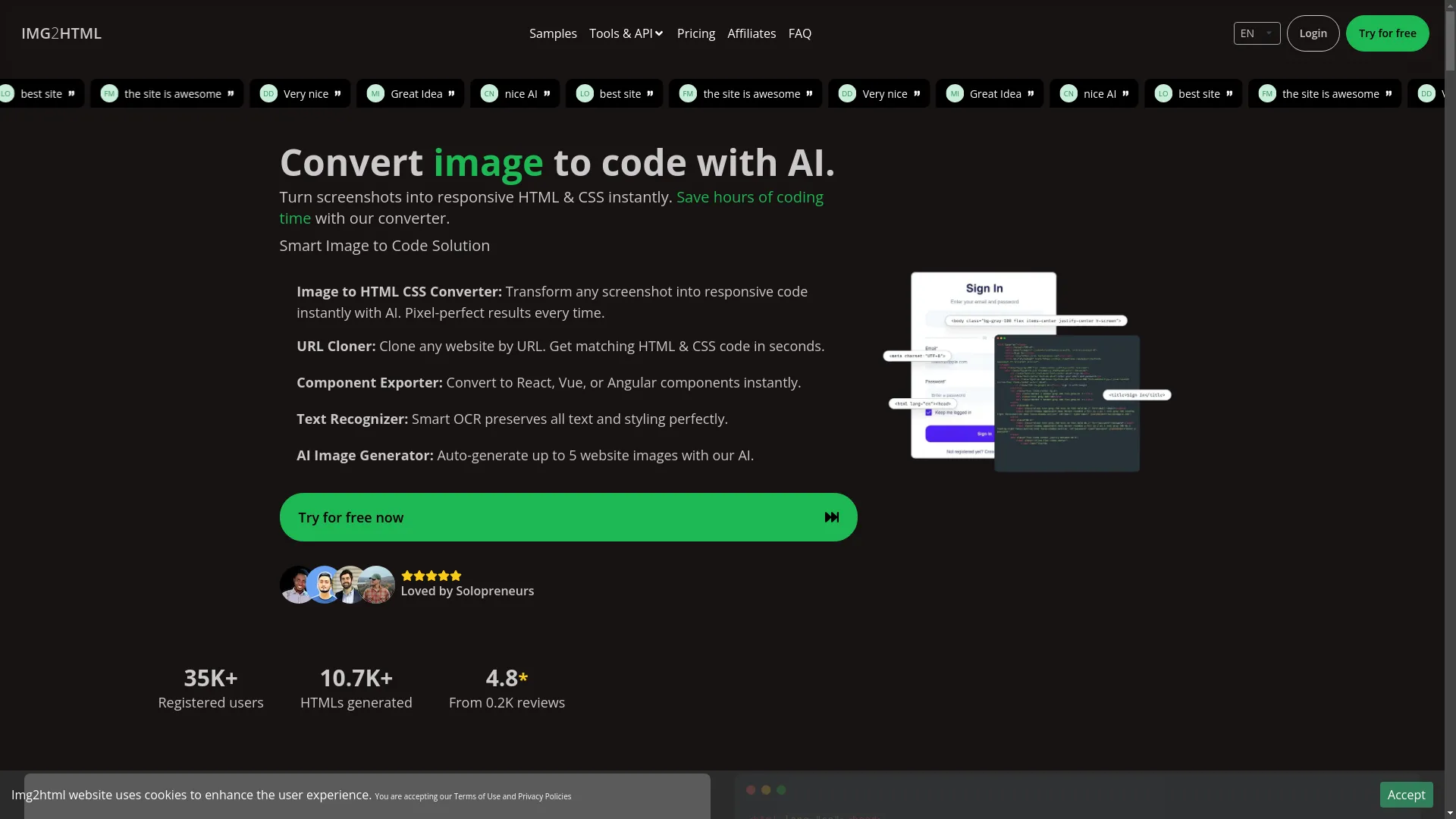
Overview: Img2html is a pretty popular Image2CodeAI tool that's really good at turning images into responsive HTML and CSS code. People like it because it's easy to use and works fast.
- Smart Conversion: It's really good at getting the details right when it looks at design elements.
- Works Everywhere: You can use it on different devices and platforms without any issues.
- Supports Frameworks: It can work with stuff like Tailwind CSS, React, Vue, and Angular.
- Extra Tools: It can do things like copy websites, export components, read text from images, and even make AI-generated images.
Pros:
- The code it makes is really accurate and clean.
- It works with lots of different frameworks and new web tech.
- It's pretty easy to use, even if you're not super techy.
Cons:
- It's not great with 3D stuff.
- Some of the cooler features might cost more.
Image2Code by Rob Shocks
Overview: This one was made by a guy named Rob Shocks. It's good at turning design images and screenshots into different types of code, including HTML, CSS, and popular JavaScript frameworks.
- Works with Lots of Frameworks: It can make code for Bootstrap, Tailwind, React, and more.
- You Can Customize It: You can tell it what kind of design you want and which framework to use.
- Gives Feedback: It gives you tips in real-time to make your code better.
Pros:
- It works with lots of different frameworks.
- You can change things to get exactly what you want.
- It's good for both simple and complicated designs.
Cons:
- You might need to fix some things by hand for really complex designs.
- It can be a bit pricey for freelancers or small businesses.
Photo 2 Code Plus
Overview: Photo 2 Code Plus is a fancy tool that not only turns images into code but also gives you advice for React/Vite and TailwindCSS projects.
- Good with React/Vite: It's made especially for these modern JavaScript frameworks.
- TailwindCSS Helper: It gives you tips on how to use TailwindCSS better.
- Makes Code Better: It tries to make the code it generates work faster and better.
Pros:
- It's really good for React and TailwindCSS projects.
- It makes the code work better.
- Great for developers who want to use AI-generated code with modern frameworks.
Cons:
- It might be too specific for some people.
- It doesn't have many features outside of React and TailwindCSS.
Other Notable Tools

While those are the big ones, there are some other cool Image2CodeAI tools worth mentioning:
- Text2Img: This one helps turn text descriptions into code or visual stuff.
- Code Convert: It's good at changing code from one programming language to another.
- Code Weaver: This one's really good at turning images into Tailwind CSS/Next.js code.
Each tool has its own special features, so it's important to think about what you need when you're picking one.
Pros of Using Image2CodeAI
Image2CodeAI tools have a bunch of benefits that are changing how designers and developers work. Let's check out the main advantages.
Time Efficiency
Ever spent hours, or even days, coding just one webpage? Image2CodeAI cuts that time way down. By automating the conversion process, these tools let you make clean, working code in seconds or minutes, freeing you up to focus on the more creative and strategic parts of your projects.
Personal Story: Imagine designing a really cool landing page with complicated layouts and animations. Normally, coding each part carefully would take forever. With Image2CodeAI, you just upload your design, tweak a few things, and bam! The code is ready to look at. It's like having a super-fast assistant who never needs to sleep.
Accessibility for Non-Coders

Not everyone's a coding wizard, and that's where Image2CodeAI really shines. Designers who are great at making things look good but aren't so hot at coding can easily bridge that gap. These tools make web development something that more people can do.
Question to Think About: Have you ever felt held back by your coding skills when trying to make your design ideas come to life?
Consistency and Accuracy
People make mistakes, especially when trying to turn complicated designs into code by hand. Image2CodeAI makes sure everything is consistent and precise, following good coding practices and standards. This means you get cleaner code that's easier to maintain and less likely to have bugs and errors.
Think of It Like This: Image2CodeAI is like a super careful editor who never misses a typo or grammar mistake, making sure your code is spotless and professional.
Integration with Modern Frameworks
These days, web development often involves using frameworks like React, Vue, Angular, or CSS frameworks like Tailwind. Image2CodeAI tools work with these technologies, making it easy to fit the code into your existing projects without a lot of hassle.
For Example: Img2html doesn't just make regular HTML and CSS, it can also make components for React, Vue, and Angular, saving you the trouble of converting things yourself.
Cons of Using Image2CodeAI
While Image2CodeAI tools are pretty awesome, they're not perfect. Understanding their limitations can help you use them better.
Limited Customization
AI tools can make code based on patterns they recognize, but they might struggle with unique or really customized designs. If your design has unusual layouts or advanced interactive elements, you might need to make a lot of changes to the code it generates.
My Opinion: It's like ordering a custom-made suit online - you get the basic fit, but you still need to make some adjustments to get it just right.
Dependence on Input Quality
The quality of what you get depends a lot on the quality of the image you put in. Blurry, messy, or overly complicated images can lead to inaccurate or messy code. Making sure your designs are high-quality and clear is really important for getting good results.
Think About It: Have you ever sent a blurry photo and got a distorted print back? It's kind of the same idea here.
Potential for Code Bloat
AI-generated code might include stuff you don't need, leading to bloated code. While these tools try to be efficient, they sometimes overdo it, adding extra classes or inline styles that can make the code messy.
Think of It Like This: It's like packing a suitcase with everything you own, just in case - you end up carrying more than you need.
Learning Curve for Advanced Features

While the basic features are usually pretty easy to use, mastering the advanced stuff or integrations can be tricky. Users might need to spend some time learning how to best use these tools for complicated projects.
Personal Experience: It's kind of like learning to drive a manual car - it's straightforward at first, but really mastering all the gears and little tricks takes practice.
Versatility Comparison: Which Tool Stands Out?
When it comes to versatility, not all Image2CodeAI tools are created equal. Let's compare some of the top tools based on different criteria to see which one offers the most flexibility.
Feature Sets
- Img2html: Offers a lot of features, including responsive design generation, framework-specific components, and extra tools like URL cloning and text recognition.
- Image2Code by Rob Shocks: Focused on supporting lots of frameworks and giving interactive feedback, good for both simple and complex designs.
- Photo 2 Code Plus: Specialized for React/Vite and TailwindCSS, with advanced advising features for these specific frameworks.
Winner: Img2html stands out with its wide range of features, making it good for all kinds of projects and user needs.
Supported Frameworks and Languages
- Img2html: Supports HTML, CSS, JS, ReactJS, VueJS, and AngularJS, plus Tailwind CSS.
- Image2Code by Rob Shocks: Works with Bootstrap, Tailwind, React, and other popular frameworks.
- Photo 2 Code Plus: Made specifically for React/Vite and TailwindCSS.
Winner: Img2html takes the lead again by supporting more frameworks and languages, giving you more options for different projects.
User Interface and Experience
- Img2html: User-friendly with an easy-to-use interface, good for both beginners and experienced developers.
- Image2Code by Rob Shocks: Interactive and customizable, good for users who want more control over the output.
- Photo 2 Code Plus: Offers advanced advising features but might be a bit much for beginners.
Winner: Img2html offers the most balanced user experience, being easy to use without skimping on advanced features.
Pricing and Scalability
- Img2html: Offers different pricing options, including pay-as-you-go and subscriptions, making it scalable for different user needs.
- Image2Code by Rob Shocks: Can be more expensive, especially for advanced features, which might not be great for freelancers or small businesses.
- Photo 2 Code Plus: Higher pricing focused on specialized frameworks, which might limit scalability for some users.
Winner: Img2html provides more flexible and scalable pricing options, working well for both individual users and bigger companies.
Real-World Applications of Image2CodeAI
Image2CodeAI tools aren't just cool tech - they have practical, real-world uses that can really improve various aspects of business and development. Let's look at some situations where these tools really shine.
Web Design and Development
The most obvious use is in web design. Designers can create awesome mockups using tools like Photoshop or Sketch and then upload these designs to Image2CodeAI tools to generate the code. This speeds up the development process, reduces mistakes, and makes sure the final website looks a lot like the original design.
Example: A freelance web designer makes a homepage design and uses Img2html to generate the HTML and CSS, saving hours of coding time and making sure everything looks exactly right.
E-commerce Platforms
For online stores, having a good-looking and functional website is super important. Image2CodeAI tools can help quickly turn product page designs into code, making sure the online store looks consistent and attractive.
Example: An online store wants to update its product pages with a new layout. By using Image2CodeAI, they can quickly generate the code, use it across multiple product pages, and make the shopping experience better for customers.
Educational Tools

Teachers and students can use Image2CodeAI to make learning experiences better. For instance, teachers can create interactive learning materials by designing them and quickly turning them into web pages.
Example: A computer science teacher designs a UI for a coding assignment and uses Image2CodeAI to generate the webpage, letting students interact with the assignment easily.
Freelance and Small Businesses

Freelancers and small businesses that don't have a lot of resources can really benefit from Image2CodeAI. These tools let them create professional-looking websites without needing to be coding experts or hire expensive developers.
Example: A small bakery wants a new website to show off its products. Using Image2CodeAI, the owner designs a nice layout and generates the code, launching the website without spending a lot on a web developer.
Latest Trends and Advancements
The field of Image2CodeAI is always changing, with new improvements aimed at making things more accurate, faster, and easier to use. Let's look at some of the latest trends shaping this area.
AI Improvements in Code Generation

AI models are getting smarter, allowing for more accurate and context-aware code generation. Better machine learning algorithms can understand complex designs better, recognize subtle elements, and produce cleaner, more efficient code.
Question to Think About: Have you ever wondered how these tools keep getting smarter every day?
Enhanced User Experience Interfaces
Developers are focusing on making these tools easier to use. With streamlined interfaces, drag-and-drop features, and real-time previews, users can see the code as it's being generated, allowing for immediate adjustments and improvements.
Think of It Like This: It's like upgrading from a simple manual to a high-tech, interactive cockpit in an airplane - everything is easier to navigate and control.
Integration with Other AI Tools
Image2CodeAI tools are increasingly working well with other AI-powered solutions, like chatbots, content generators, and analytics tools. This creates a more cohesive and efficient workflow, allowing users to handle multiple aspects of web development seamlessly.
Example: Combining Image2CodeAI with an AI content generator can enable the creation of both the design and the text content for a webpage at the same time.
Support for Diverse Design Formats
To cater to more people, Image2CodeAI tools are expanding their support beyond traditional image formats. This includes support for vector graphics, 3D designs, and interactive prototypes, making the tools more versatile for various design needs.
Personal Experience: I once tried converting a complicated 3D mockup, and having tools that support 3D images would have saved me a lot of time and hassle!
Strategies for Maximizing Image2CodeAI Tools
To get the most out of Image2CodeAI tools, it's important to use strategies that make them work better and ensure high-quality outputs. Here are some tips to help you maximize these tools.
Optimizing Image Inputs

The quality of your input image directly affects how accurate the generated code will be. Make sure your designs are clear, well-organized, and not too complicated. High-resolution images with distinct elements will give you better results.
Tip: Use design tools that let you export clear, high-quality images. Organize your layers and elements logically to make it easier for the AI to recognize them.
Combining Tools for Better Results
While Image2CodeAI tools are powerful on their own, using them with other tools can make them even better. For instance, using a UI design tool alongside Image2CodeAI can streamline the entire design-to-code process.
Example: Design your UI in Figma, export the design, and use Img2html to generate the code. Then, integrate the code with a CMS like WordPress for a complete workflow.
Regularly Updating and Reviewing Code

AI-generated code isn't always perfect. Regularly check and update the code to make sure it meets your project's standards and requirements. This includes optimizing for performance, fixing any issues, and making sure it works well across different browsers and devices.
My Opinion: Think of the AI-generated code as a first draft. Just like any good writing, it gets better with revisions and improvements to reach its full potential.
Leveraging Template Libraries
Many Image2CodeAI tools come with built-in templates or let users create and save their own. Using these templates can speed up the design process and ensure consistency across multiple pages or projects.
Tip: Create a library of your favorite templates to reuse in different projects, saving time and keeping a consistent look and feel.
Importance of User Experience and Performance Metrics
Creating a website isn't just about making it look good - user experience (UX) and performance are super important for any web project to succeed. Image2CodeAI tools affect both these aspects, and understanding their impact is crucial.
Measuring Code Quality

High-quality code is clean, efficient, and easy to maintain. Things like how readable the code is, whether it follows best practices, and how little unnecessary stuff it has are important indicators of code quality.
Question to Think About: Do you ever wish the code you work with was as clean and organized as your favorite neatly arranged desk?
User Feedback and Iterative Improvements

Getting feedback from users helps in making both the design and the code better. Image2CodeAI tools can use this feedback to improve their algorithms, making sure that the generated code better meets what users expect over time.
Example: If users keep asking for better handling of specific elements like sliders or pop-ups, AI tools can focus on improving those aspects in future updates.
Balancing Speed and Accuracy

While speed is a big advantage of Image2CodeAI, it's important to balance it with accuracy. Fast code generation is great, but not if it means the code doesn't work well or perform poorly.
Think of It Like This: It's like ordering fast food - quick and convenient, but you still want it to taste good and be healthy!
Conclusion
So, what's the final word on Image2CodeAI tools? They're definitely game-changers in web design and development, offering impressive time savings, accessibility, and integration capabilities. Tools like Img2html are leading the pack in versatility, offering a wide range of features that work for all kinds of users, from beginners to experienced developers.
However, it's important to keep in mind their limitations, like limited customization options and dependence on input quality. By using smart strategies - like optimizing image inputs, combining tools, and regularly reviewing code - you can get the most out of Image2CodeAI and create awesome, functional websites easily.
In this constantly changing field, staying up-to-date with the latest advancements and continuously improving your approach will ensure that you get the full benefit of these innovative tools. So, why wait? Jump into the world of Image2CodeAI and change the way you design and develop websites today!
Ready to turn your designs into code effortlessly? Try out one of the top Image2CodeAI tools mentioned above and experience the future of web development firsthand. Share your experiences and join the conversation on how AI is changing the creative landscape! Explore Img2html today.
Frequently Asked Questions (FAQ)
-
What image formats do Image2CodeAI tools support?
Most Image2CodeAI tools work with common formats like JPG, PNG, and SVG. Some advanced tools can also handle vector graphics and interactive prototypes, so they work with lots of different design tools.
-
Can Image2CodeAI handle responsive web design?
Absolutely! Tools like Img2html are designed to make responsive HTML and CSS code that adjusts to different screen sizes, so your website looks great on all devices.
-
Do I need to know how to code to use Image2CodeAI tools?
Nope! These tools are made with users in mind, so even if you don't know much about coding, you can still generate clean, working code from your designs easily.
-
Can I change the code that Image2CodeAI generates?
Yes, while the AI makes a good starting point, you can and should customize the code to fit your specific needs and preferences, making it work better and do exactly what you want.
-
How accurate is the code generated by Image2CodeAI?
The accuracy varies depending on the tool and how complex the design is. Top tools like Img2html usually provide very accurate and clean code, but complicated designs might still need some manual adjustments.
-
Are Image2CodeAI tools expensive?
Pricing varies across different tools. Some offer basic free versions with limited features, while advanced functionalities often come with subscription-based models. It's best to choose a tool that fits your budget and needs.
-
Can Image2CodeAI tools work with other AI solutions?
Yes, many Image2CodeAI tools are designed to work seamlessly with other AI-powered solutions, improving your workflow and expanding what they can do.
-
Are there any privacy concerns with using Image2CodeAI tools?
Most reputable tools follow strict data privacy standards, but it's always a good idea to check their privacy policies, especially if you're working with sensitive or proprietary designs.
-
How often are Image2CodeAI tools updated?
Leading tools frequently update their algorithms and features to include the latest advancements in AI, making sure they stay effective and relevant.
-
Can Image2CodeAI tools replace web developers?
While these tools make the coding process much easier, they complement rather than replace human developers. Human expertise is still essential for refining code, ensuring functionality, and handling complex tasks.
Using Image2CodeAI is like having a magic wand in your web development toolkit. It's not just about saving time - it's about boosting creativity, improving accuracy, and making web development more accessible to everyone. So, go ahead and give these tools a try. Your designs deserve the best, and with Image2CodeAI, you're just a click away from turning them into reality!