IMG2HTML review (updated October 2026): image to HTML with AI, prices and real examples
Ever looked at a cool website and thought, Man, I wish I could make that without spending forever coding? You're not alone. Whether you're a pro developer, a creative designer, or just someone...
IMG2HTML converts a screenshot or mockup into editable HTML + Tailwind in under 30 seconds; plans from $1.99/month for 3 conversions. Four real conversions with the unedited output are on the image to HTML converter page, and the current plans on pricing.
Table of Contents
Intro
Ever looked at a cool website and thought, "Man, I wish I could make that without spending forever coding"? You're not alone. Whether you're a pro developer, a creative designer, or just someone with a great idea, turning pictures into real HTML code can be a game-changer. That's where Img2html comes in. It's been making waves in 2024 because it can turn images into clean, responsive HTML and CSS code without breaking a sweat. But here's the million-dollar question: Is Img2html really the best tool out there for turning pictures into websites in 2024? Let's dig in and find out!
Getting to Know Img2html
What's Img2html?
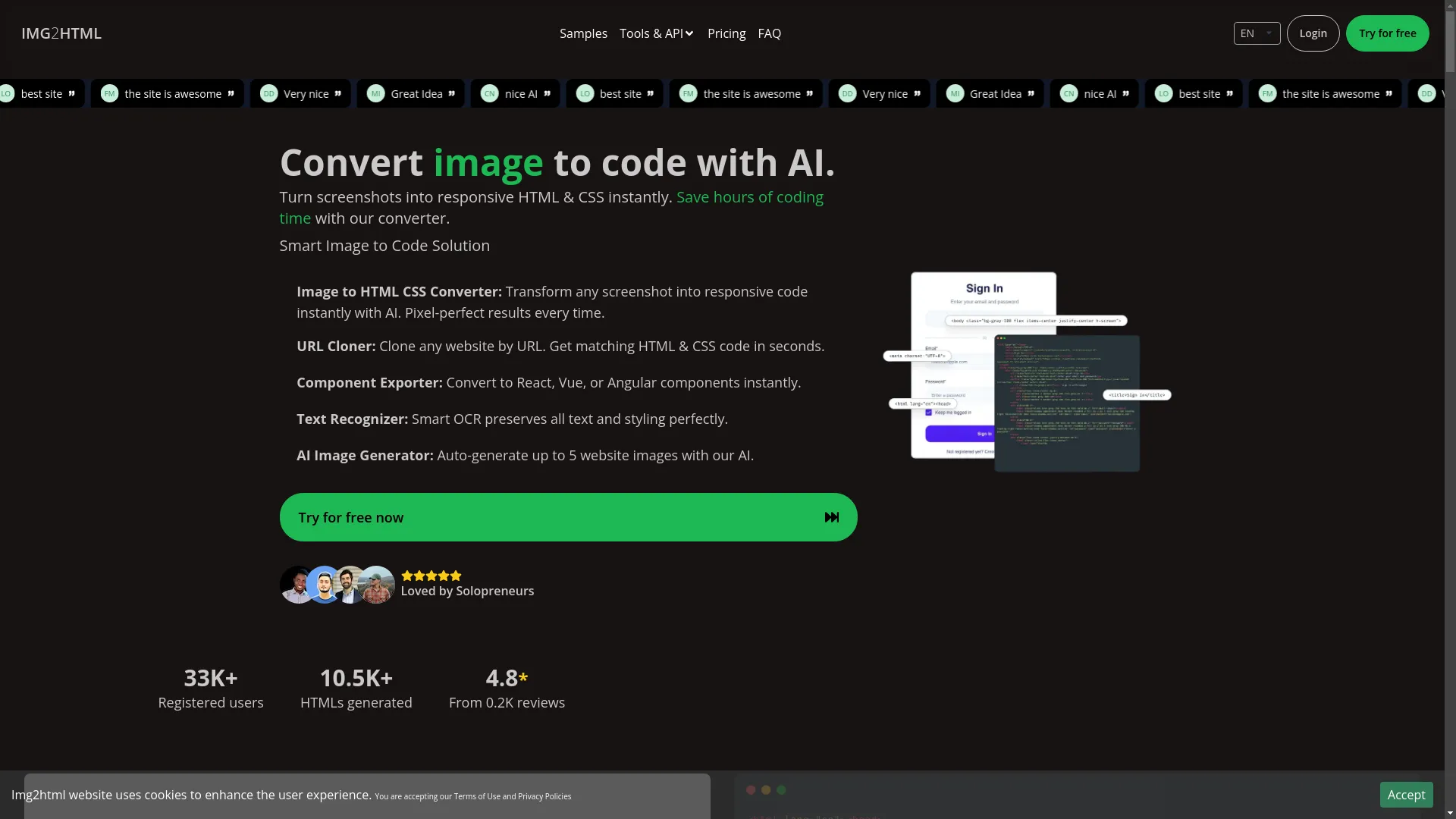
Img2html is like a super smart robot that can look at pictures of websites or designs and turn them into actual code. Imagine having a magic wand that takes your visual ideas and turns them into working web pages in seconds. Sounds too good to be true, right? Well, with Img2html, it's actually happening.
How Does It Work?
Think of Img2html as your personal code translator. Here's how it works:
- You show it a picture: Upload a screenshot, design, or any image with website stuff in it.
- The AI looks at it: Smart computer brains scan the image, figuring out all the parts like headers, buttons, text, and pictures.
- It makes code: Based on what it sees, Img2html writes the HTML and CSS code. It even makes sure the code works well on phones and tablets.
- You get the code: Once it's done, you can download the code and use it in your projects.
This saves you from the boring, time-consuming job of writing all that code by hand, so you can focus on the fun, creative stuff instead. Try Img2html today
Cool Stuff Img2html Can Do
Turn Pictures into HTML & CSS
Img2html is really good at turning any picture into web-ready HTML and CSS code. Whether it's a simple landing page or a complicated app design, it makes sure everything looks just right.
Copy Websites
Ever wanted to copy a whole website? With Img2html's URL Copier, you can put in any website address, and it'll grab the layout and design, turning it into matching HTML and CSS code in no time. It's like having a web designer in your computer! Learn more about Picture to HTML
Export Components
For developers who like using modern frameworks, Img2html can export components. This means it can turn the code it makes into React, Vue, or Angular pieces instantly. Imagine easily adding AI-made code into your favorite development tools without any hassle.
Read Text
Keeping text and how it looks is super important in web design. Img2html uses smart technology to keep all the text and how it's styled exactly right. No more messy code with missing words - everything stays in place and looks great.
Make AI Images
Need more pictures for your website? Img2html can make up to five website images per credit, giving you high-quality pictures for your projects without leaving the tool.
Why Img2html is Awesome in 2024
Super Smart AI
The heart of Img2html is its really smart AI. Unlike basic tools, Img2html's AI has seen tons of web designs, so it understands complicated layouts. This means it makes cleaner, more accurate code that looks a lot like your original design without extra junk.
Quick and Efficient
Time is money, right? Img2html can turn images into HTML and CSS up to 5 times faster than other tools out there. Whether you're in a rush or working on lots of projects, this speed helps you get more done and stay ahead. Check out Img2html Pricing
Nice, Clean Code
Nobody likes messy code. Img2html is proud of making clean, well-organized, and responsive HTML and CSS code. This means the code is easy to read, fix, and make bigger, ensuring your website works great on all devices and screen sizes.
Works with Popular Frameworks
These days, lots of people use frameworks like React, Vue, and Angular for web development. Img2html works great with these, letting you export code made just for each one. This means you can easily use AI-generated code in your projects without any problems.
Easy to Use
You don't need to be a tech genius to use Img2html. The website is easy to use and navigate, making it great for all kinds of users. Whether you're just starting to build your first website or you're an experienced developer looking to work faster, Img2html works for everyone. Learn How to Use Img2html
Img2html vs Other Tools
Img2html and Fronty
When you compare Img2html to Fronty, there are some big differences:
| Feature | Img2html | Fronty |
|---|---|---|
| Accuracy | 99.9% | Moderate, needs tweaking for complex designs |
| Speed | Up to 5x faster | Slower |
| Framework Support | Excellent with React, Vue, Angular | Limited support |
| User Experience | User-friendly, great for beginners | Better for simple projects |
Overall, Img2html outperforms Fronty in accuracy, speed, and user experience. If you're working on complex projects or need seamless integration with modern frameworks, Img2html is the clear winner. Compare Pricing Plans
Img2html and Avocode
Avocode is another popular tool for turning designs into code, mainly focusing on helping teams work together.
| Feature | Img2html | Avocode |
|---|---|---|
| Team Features | Automates code generation | Great for team collaboration and version control |
| Code Quality | Clean and complete HTML & CSS | Good snippets, but not full code |
| Speed | AI-powered and faster | Slower, depends on team workflows |
While Avocode excels in team collaboration and design handoff, Img2html takes the lead in automated, high-quality code generation. For developers seeking speed and clean code, Img2html is the better choice. Explore Img2html Features
Img2html and Zeplin
Zeplin is known for helping designers and developers work together by sharing design details.
| Feature | Img2html | Zeplin |
|---|---|---|
| Design Handoff | Generates complete code from images | Provides detailed specs and asset management |
| Code Generation | Produces responsive HTML and CSS | Offers CSS snippets and style guides |
| Ease of Use | User-friendly with automated processes | Requires manual integration of code |
Zeplin is excellent for detailed design handoffs and asset management within teams. However, Img2html goes a step further by automatically generating complete, responsive code, making it a more efficient tool for developers who want to streamline their workflow. Read Detailed Comparison
What People Are Saying
Teachers
Alexander Gonzalez, Teacher:
"As a teacher, being able to make learning stuff from pictures is fantastic! I can draw how I want my content to look and then use IMG2HTML to make it real. I can even add interactive bits using code. This lets me quickly make 90% of my idea! IMG2HTML is awesome!"
Developers
Daniel Davis, CTO:
"Very nice platform. The AI's ability to make clean and responsive code is impressive."
Myles Ihaia, Developer:
"Great Idea! Would have loved some free credits just to test it for myself though, pity that."
Marketing Folks
Mark Njoroge, Marketing Specialist:
"The site is outstanding. IMG2HTML saved me so much time and made the process seamless. The integration with various frameworks is a massive bonus."
Designers
Joanna Smith, UI/UX Designer:
"Img2html has completely changed how I work. I can now focus more on design without worrying about the coding part."
Pricing and What You Get
How Credits Work
Img2html uses a credit system, where each image conversion costs 1 credit. This flexible approach means you only pay for what you use, with no hidden fees or long-term commitments.
Different Plans
- Starter, 40 credits: $9.99 a month, for occasional users.
- Plus, 200 credits: $29.99 a month, recommended for regular users.
- Advanced, 500 credits: $59.99 a month, for heavy users needing lots of conversions.
- Trial, 3 credits: $1.99 a month, the cheapest way to try the AI converter.
Try It Free
Starter, Plus and Advanced start with a 3-day free trial that includes 5 credits (a card is required and the plan is charged if you do not cancel before the trial ends). Plus, their risk-free service guarantee means you can change your plan or cancel anytime, with unused credits rolling over as long as you stay subscribed.
Start Your Free TrialExtra Cool Features
Chrome Add-on
Img2html's Chrome Extension brings the power of image-to-code conversion right to your browser. Whether you're browsing design platforms like Dribbble or need to copy a website's layout, the extension lets you convert images directly from any webpage without downloading them first. It works on Windows, Mac, and Linux, so it fits right in with all your devices.
Download Chrome Add-on
API Stuff
For developers and businesses wanting to add image-to-code features into their own apps or workflows, Img2html offers robust API integration. This lets you automate the image conversion process within your tools, whether you're building a design platform, a CMS, or any other web service. The API works with lots of programming languages and frameworks, making it versatile and scalable.

Example Usage with cURL:
curl -X POST https://api.img2html.com/generate-html -F '[email protected]' -F 'api_key=your_api_key' -F 'file=@path_to_your_image_file'
This command sends a request to Img2html's API, uploading your image and getting the HTML and CSS code back. It's that easy!
AI Code Editor
Img2html also has an AI HTML Editor, an unlimited-use feature that lets you fine-tune the generated code right on the platform. Whether you need to make small tweaks or big changes, the editor gives you the flexibility you need without switching between different tools.
Explore AI Code Editor
Questions People Ask a Lot
How can I try it?
Getting started is easy! Visit img2html.com and pick a plan: the Trial plan gives you 3 conversions for $1.99 a month, and Starter, Plus and Advanced start with a 3-day free trial with 5 credits (card required).
How long do credits last?
Credits are flexible. Depending on your plan, unused credits can roll over as long as you stay subscribed, making sure you get the most value out of your purchase.
What payment methods are accepted?
Img2html accepts major credit cards and other secure online payment options. All transactions are encrypted to keep your financial information safe.
Do you offer refunds?
Yes! If you're not happy with the service, Img2html offers refunds within a certain period. Check their Terms of Use for detailed refund policies.
What does my credit purchase include?
Each credit lets you convert one image to HTML. Higher-tier credit packages come with extra benefits like access to the Chrome Extension, API integration, AI Image Generator, and more advanced features.
How does the credit system work?
You buy credits based on how much you think you'll use. Each image conversion uses a specific number of credits, so you only pay for what you use. This system is cost-effective and scalable, working for users of all sizes.
Is there any advantage to purchasing more credits at once?
Absolutely! Buying larger credit packages typically offers a better rate per credit, giving you more value for your money and reducing the overall cost per image conversion.
How can I manage my credits?
Managing your credits is easy through your account dashboard on Img2html. You can track your usage, buy more credits, and view your subscription details all in one place.
Is the payment process secure?
Yes, all payment processes are secured with advanced encryption technologies, keeping your financial data protected at all times.
Are there any free credits available?
There are no free credits on sign-up. You can try IMG2HTML with the 3-day free trial of Starter, Plus or Advanced (5 credits), or with the Trial plan: 3 credits for $1.99 a month. The text-only OCR extractor on the image to HTML page is free.
How to convert an image to HTML using IMG2HTML?
Just upload your image to the platform, choose your desired output options (like framework support), and start the conversion. The AI does the rest, delivering clean HTML and CSS code in seconds.
What happens if I run out of credits?
If you use up your credits, you can easily buy more through the platform. Depending on your subscription, you might also have the option to auto-renew or adjust your credit package to fit your needs.
Where are my credits?
Your credits are tied to your account and can be managed through your user dashboard. You can see your remaining credits, usage history, and buy more as needed.
What's Next for Turning Pictures into Websites
The world of turning images into HTML is changing fast, thanks to new developments in AI and machine learning. Img2html is leading the way, always improving its algorithms to make even more accurate and efficient conversions. As AI technology gets smarter, we can expect things like:
- Better Design Recognition: Understanding complex design elements and interactive parts even better.
- Improved Framework Integration: Working smoothly with upcoming frameworks and technologies.
- More Customization: More options for tailoring the generated code to specific project needs.
- Automated Optimization: AI-driven improvements for performance, accessibility, and SEO.
Img2html is committed to staying ahead of the game, making sure it remains a valuable tool for developers and designers alike, adapting to the changing needs of the web development world. Learn More about AI in Image to Code
AI Enhancements in Web Development
Wrapping It Up
In the fast-changing world of web development, tools that save time and make things easier are super valuable. Img2html stands out as a top-notch image to HTML converter in 2024, thanks to its smart AI technology, speed, accuracy, and user-friendly interface. Whether you're an experienced developer looking to work faster, a designer wanting to bring your ideas to life without diving deep into coding, or a marketer needing quick and reliable code conversions, Img2html has got you covered.
With features like copying websites, exporting components, recognizing text, and making AI images, Img2html is more than just a converter—it's a complete solution for modern web development. Plus, its flexible pricing and credit system make it accessible to all kinds of users, making sure you only pay for what you need.
But don't just take our word for it. With over 33,000 registered users and 10.5K HTMLs generated, Img2html has proven its worth across various industries and uses. The great reviews and high user satisfaction ratings further show it's a leading tool in the image to HTML conversion market.
So, why wait? Experience the future of web design by giving Img2html a try. Whether you're looking to convert a single image or manage multiple projects, Img2html offers the flexibility, speed, and quality you need to stay ahead in the competitive digital world.
Start your AI-powered web development journey today with Img2htmlTransform Your Design Workflow
Turn your designs into reality without breaking a sweat!