Converting Latex To Html
Effortlessly convert LaTeX to HTML with AI tools! Learn techniques, tools, and best practices to create responsive, web-ready documents.
Table of Contents
- Intro
- What's LaTeX and HTML?
- Why switch from LaTeX to HTML?
- Old school conversion methods
- New tricks: AI and fancy tools
- IMG2HTML: Bridging images and code
- Step-by-step LaTeX to HTML guide
- Must-have tools and resources
- Best practices for smooth conversion
- Making it user-friendly and fast
- Common headaches and fixes
- What's next for LaTeX to HTML
- Wrapping it up
- Time to act
Intro

Ever get stuck trying to turn your LaTeX docs into something that looks good on the web? You're not the only one. Whether you're a academic, researcher, or just someone who likes to code, figuring out how to get LaTeX into HTML can be a real pain. But here's the thing - as the internet keeps changing, so do our tools for making and sharing content. Imagine being able to take your carefully crafted LaTeX documents and turn them into slick, responsive HTML pages with just a few clicks. Sounds too good to be true, right? Well, it's actually closer to reality than you might think. Let's dive into the world of LaTeX to HTML conversion and check out the latest tricks, strategies, and tools that are making this whole process a lot easier.
What's LaTeX and HTML?
Before we jump into how to convert stuff, let's break down what LaTeX and HTML actually are, and why they're so important in their own areas.
LaTeX is this high-quality system for making documents that's super popular for science and math papers. It's great at handling formulas and bibliographies, which is why academics love it. It makes sure your documents look good and are structured properly.
On the flip side, HTML is what makes the internet work. It's the standard language for creating and organizing content online, from basic web pages to complicated web apps. HTML makes sure your content works on all kinds of devices and platforms.
While LaTeX is awesome for preparing documents, HTML is the king of web presentation. The tricky part is when you need to make these two work together, keeping your LaTeX stuff looking good while also making it web-friendly.
Why switch from LaTeX to HTML?
You might be thinking, "If LaTeX works fine for me, why bother changing?" Good question! Here's why it might be worth it:
- More people can see it: HTML stuff can be viewed on any device with a web browser, so more people can access your work.
- Interactive elements: HTML lets you add things like links, videos, and dynamic content, which makes it more engaging.
- Better for search engines: Web content in HTML can be optimized so search engines can find it easier, which means more people might see your work.
- Works with online platforms: A lot of online platforms and content management systems use HTML, so it's easier to work together and share content.
- Looks good on any screen: HTML makes sure your content adjusts to fit different screen sizes and devices, so it always looks good.
Basically, converting LaTeX to HTML gives you the best of both worlds - you get the solid document preparation of LaTeX and the dynamic web presentation of HTML.
Old school conversion methods
Back in the day, turning LaTeX into HTML was a bit of a hassle. Here's how people used to do it:
- Manual conversion: This meant rewriting LaTeX content into HTML code by hand. It worked for simple stuff, but it took forever and was easy to mess up, especially for complicated documents with lots of formatting and equations.
- Pandoc: This is a versatile tool that can convert LaTeX to HTML. It's okay for basic structures but often struggles with complex formatting and specialized LaTeX packages.
- LaTeX2HTML: This was an early tool made specifically for this job. It automated some things, but you often had to do a lot of manual tweaking to get it looking right.
- TeX4ht: This is a configurable converter that can turn LaTeX into various formats, including HTML. It offers more customization but can be pretty tricky to learn.
These methods were a good start, but they often fell short when it came to producing clean, responsive, and accurate HTML code without a lot of manual work.
New tricks: AI and fancy tools
The world of LaTeX to HTML conversion has come a long way with AI and advanced conversion tools. These new approaches aim to make the process more automatic, more accurate, and produce web-ready code with less effort. Here's what's new:
- AI-Powered Conversion Tools: These tools use artificial intelligence to understand how LaTeX documents are structured and formatted, and then turn them into clean HTML code. They're better at handling complex stuff like math formulas, tables, and custom formatting.
- Real-Time Preview and Editing: Advanced converters let you see how your converted HTML will look on the web in real-time. This helps you make quick adjustments and make sure the final result looks how you want it to.
- Works with CMS and Web Platforms: Modern tools often work seamlessly with popular content management systems (like WordPress ) and web development platforms, making it easier to go from document preparation to publishing on the web.
- Customization and Theming: These tools give you options to customize the HTML output, so you can keep your brand consistent and apply specific themes or styles as needed.
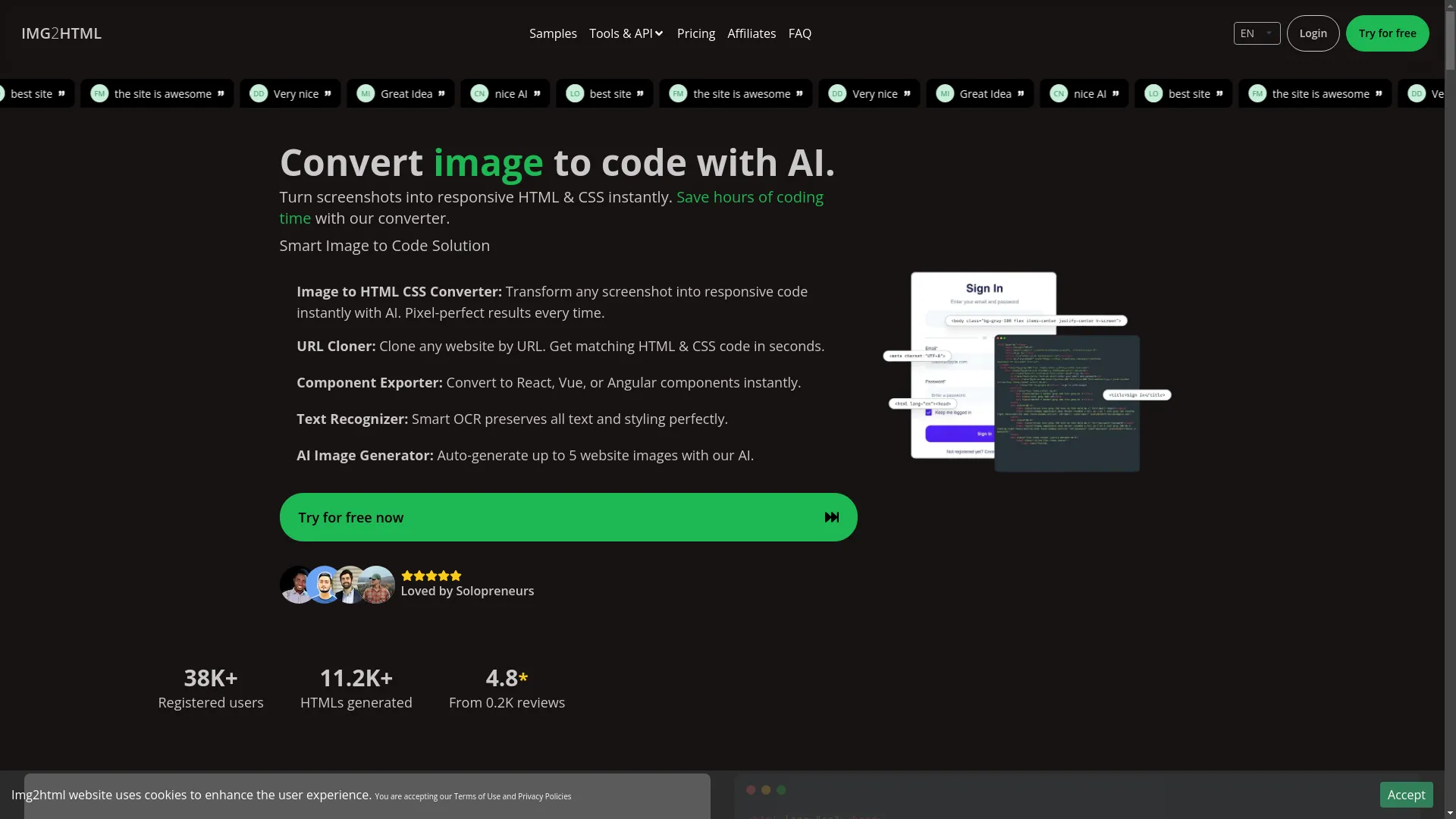
One tool that shows off these advancements is IMG2HTML. While it's mainly for turning images into HTML, it shows how AI can automate and improve the conversion process.
IMG2HTML: Bridging images and code
IMG2HTML demonstrates the potential of AI in automating content conversion, providing clean and responsive HTML and CSS code with minimal effort.
IMG2HTML: Bridging images and code
Let's take a closer look at IMG2HTML, a cool tool designed to turn images into responsive HTML and CSS code using AI. While it's not specifically for LaTeX to HTML conversion, understanding what it can do gives us an idea of how AI can revolutionize content conversion processes.
Key Features of IMG2HTML:
- AI-Powered Conversion: Uses advanced algorithms to analyze and convert images into clean, responsive HTML and CSS code instantly.
- URL Cloner: Lets users clone entire websites by URL, generating matching HTML and CSS code in seconds.
- Component Exporter: Supports conversion to modern JavaScript frameworks like React, Vue, or Angular components, catering to different development needs.
- Smart OCR (Text Recognizer): Uses Optical Character Recognition to keep all text and styling perfect during conversion.
- AI Image Generator: Automatically generates up to five website images, making the design process easier without manual effort.
- User-Friendly Interface: Designed to be easy to use and navigate.
- Works on Different Platforms: Works well across various devices and platforms, including support via a Chrome Extension .
- API Integration: Offers robust API capabilities, allowing developers to integrate IMG2HTML's functionalities into their existing workflows and tools.
Why IMG2HTML Matters:
IMG2HTML shows how AI can streamline the conversion process, reducing the time and effort traditionally required. Its ability to generate pixel-perfect, responsive code aligns with what modern web development needs, making it valuable for developers, designers, and content creators.
While IMG2HTML is tailored for image to HTML conversion, the underlying principles can inspire similar advancements in LaTeX to HTML converters, focusing on automation, accuracy, and user-friendly design.
Step-by-step LaTeX to HTML guide
Ready to turn your LaTeX documents into HTML? Let's walk through the process, looking at both old and new approaches, including using advanced tools like AI-powered converters.
a. Online converters
There are several online platforms that offer LaTeX to HTML conversion services. These tools are easy to use and you don't need to install anything on your computer.
- Choose a reliable converter: Platforms like Pandoc Online , Overleaf , or other dedicated converters can be good places to start.
- Upload your LaTeX document: Most online converters let you upload .tex files directly or paste in LaTeX code manually.
- Configure conversion settings: Some tools give you options to customize the output, like including MathJax for rendering mathematical formulas.
- Start the conversion: Click the convert button and wait for it to finish.
- Download or copy the HTML code: Once it's converted, you can download the HTML file or copy the code to use in your web project.
Pros:
- Quick and easy to use.
- No need to install anything.
- Can be accessed from any device with internet.
Cons:
- Limited customization options.
- Might struggle with complex LaTeX structures.
- Privacy concerns with sensitive documents.
b. LaTeX packages
If you prefer a more hands-on approach, there are certain LaTeX packages that help with conversion to HTML.
Example: htlatex
htlatex is part of the TeX4ht package and lets users convert LaTeX documents to HTML.
- Install TeX4ht: Make sure TeX4ht is installed in your LaTeX distribution.
- Prepare your LaTeX document: Make sure your document is well-structured and free of errors.
-
Run the conversion command:
htlatex your_document.tex - Review and edit the output: The generated HTML might need some manual tweaks to look its best.
Pros:
- More control over the conversion process.
- Better handling of LaTeX-specific features.
Cons:
- Steeper learning curve.
- Requires familiarity with LaTeX and command-line operations.
- Output might still need manual adjustments.
c. Manual conversion
When automated tools don't cut it, manual conversion ensures precision, especially for highly specialized documents.
- Extract the content: Separate the text, equations, figures, and other elements from your LaTeX document.
- Convert text to HTML: Use standard HTML tags to structure your content.
- Handle mathematical equations: Use MathJax or similar libraries to render LaTeX-style equations in HTML.
- Integrate figures and tables: Convert LaTeX figures and tables into HTML-compatible formats, making sure they're responsive.
- Apply CSS for styling: Use CSS to match the styling of your original LaTeX document or to fit your web design theme.
- Test the HTML page: Make sure all elements display correctly across different browsers and devices.
Pros:
- Ultimate control over the final output.
- Tailored to specific needs and design preferences.
Cons:
- Takes a lot of time.
- Requires extensive knowledge of HTML, CSS, and possibly JavaScript.
- Prone to human error.
Must-have tools and resources
Converting LaTeX to HTML can be smoother with the right set of tools. Here's a list of essential resources to help with the process:
- Pandoc: A versatile document converter that supports many formats, including LaTeX to HTML.
- TeX4ht: A powerful LaTeX to HTML converter offering lots of customization options.
- MathJax: A JavaScript library that renders LaTeX mathematical notation in HTML documents.
- Overleaf: An online LaTeX editor that works with various conversion tools.
- IMG2HTML: While it's mainly for image to HTML conversion, it shows how AI can help with automated content transformation.
- Visual Studio Code: A code editor with extensions for handling LaTeX and HTML, helpful for manual conversion.
- LaTeXML: A LaTeX to XML/HTML converter that focuses on mathematical content and semantic enrichment.
- Markdown: Simplifying the content transfer by converting LaTeX to Markdown first, then to HTML.
- WYSIWYG Editors: Tools like Adobe Dreamweaver can help in refining manually converted HTML code.
- GitHub Pages: For hosting and testing your converted HTML documents easily.
Each of these tools has unique features that help with different parts of the conversion process. Depending on what you need, you might find some more useful than others.
Best practices for smooth conversion
Getting a high-quality LaTeX to HTML conversion is more than just transferring content. Here are some best practices to make sure your HTML output is polished, functional, and user-friendly:
-
Keep the structure:
Use appropriate HTML tags (like
<header>,<article>,<section>,<footer>) to improve accessibility and SEO. - Optimize images and media: Make sure all images are web-optimized to reduce load times without losing quality.
- Use responsive design: Make sure your HTML layout adapts well to various screen sizes and devices.
- Use CSS for styling: Separate content from design by using CSS to handle all styling aspects, keeping your HTML code cleaner.
- Use MathJax for equations: Use MathJax or similar libraries to accurately show mathematical formulas, keeping the integrity of your LaTeX content.
- Test on different browsers: Regularly test your HTML pages on different browsers (Chrome, Firefox, Safari, Edge) to make sure they look consistent.
- Validate your HTML code: Use validators like the W3C Markup Validation Service to check for and fix any code errors.
- Optimize for SEO: Use SEO best practices, like using meta tags, descriptive titles, and proper heading hierarchies, to make your content more visible in search engines.
- Make it accessible: Follow accessibility guidelines (like WCAG ) to make your content usable for people with disabilities.
- Keep content updated: Regularly review and update your HTML content to keep up with the latest web standards and user expectations.
By following these practices, you not only improve the quality of your HTML output but also make sure your content is accessible, engaging, and optimized for the modern web.
Making it user-friendly and fast
In today's fast-paced digital world, user experience (UX) and website performance are super important. When converting LaTeX to HTML, it's crucial to prioritize these aspects to make sure your content resonates with your audience. Here's how to do it:
Enhancing User Experience
- Easy navigation: Organize your content with clear headings, subheadings, and a logical flow, making it easy for users to find what they need.
- Readable text: Choose web-friendly fonts and make sure there's enough contrast between text and background for easy reading.
- Interactive elements: Add interactive features like collapsible sections for formulas or expandable tables to keep users engaged.
- Consistent design: Keep styling consistent throughout your HTML document to provide a cohesive look and feel.
- Accessible content: Make sure your content is accessible to all users, including those using assistive technologies.
Boosting Performance
- Smaller file sizes: Compress images and optimize media to make pages load faster.
- Efficient code: Clean, well-structured HTML and CSS code helps with loading speed and performance.
- Lazy loading: Implement lazy loading for images and media to improve initial page load times.
- Caching strategies: Use browser caching to store frequently accessed resources, reducing server load and speeding up content delivery.
- Optimize scripts: Minimize and defer JavaScript loading to prevent it from slowing down the rendering of your HTML content.
By focusing on UX and performance, your converted HTML content not only looks good but also works smoothly, providing a better experience for your audience.
Common headaches and fixes
Converting LaTeX to HTML isn't always smooth sailing. Various challenges can pop up, but with the right strategies, they can be effectively addressed.
1. Dealing with complex math equations
Problem: LaTeX is great at showing complex mathematical formulas, but translating them accurately to HTML can be tricky.
Solution: Use MathJax or KaTeX —these are JavaScript libraries designed to render LaTeX equations in web browsers. These tools make sure your equations look crisp and work across different devices.
2. Keeping document structure intact
Problem: Maintaining the hierarchical structure of sections, subsections, and other elements from LaTeX to HTML.
Solution: Use robust conversion tools like Pandoc or LaTeXML that recognize and preserve the structural hierarchy, translating LaTeX commands into appropriate HTML tags.
3. Handling custom LaTeX commands
Problem: Custom commands and macros in LaTeX might not have direct equivalents in HTML, leading to inconsistencies.
Solution: Preprocess your LaTeX documents to replace custom commands with standard equivalents or define them within the conversion tool's settings to ensure accurate translation.
4. Converting images and figures
Problem: Converting LaTeX-included images and figures into responsive, web-friendly formats.
Solution: Make sure images are exported in web-optimized formats (like JPEG or PNG) and use CSS to make them responsive. Tools like IMG2HTML can help convert image-heavy documents into HTML seamlessly.
5. Keeping styling and formatting consistent
Problem: Translating LaTeX's precise styling into the more flexible and varied styling options of HTML and CSS.
Solution: Use CSS frameworks (like Bootstrap or Tailwind CSS ) to replicate LaTeX's styling or customize your CSS to match the desired look, ensuring consistency and visual appeal.
6. Making sure it's accessible
Problem: Making sure that the converted HTML content is accessible to all users, including those with disabilities.
Solution: Follow Web Content Accessibility Guidelines (WCAG) during conversion, using semantic HTML tags, providing alternative text for images, and ensuring keyboard navigability.
What's next for LaTeX to HTML
As technology keeps advancing, so do the tools and methods for content conversion. Here's a glimpse into what the future might hold for LaTeX to HTML conversion:
- More advanced AI: AI and machine learning algorithms will play a bigger role in making content conversion more accurate and efficient, understanding context, and optimizing formatting.
- Real-time conversion tools: Expect tools that offer real-time preview and instant conversion, allowing for on-the-fly adjustments and immediate feedback.
- Better collaboration features: Tools will work more seamlessly with collaborative platforms, letting multiple users work on conversions at the same time with version control.
- Better support for multimedia: Future converters will handle multimedia elements better, making sure that videos, interactive charts, and other dynamic content are accurately translated into HTML.
- More customization options: Conversion tools will offer more customization options, letting users define specific styling preferences, layout structures, and component integrations.
- Integration with modern web frameworks: As web development frameworks evolve, converters will offer better support for integrating converted content into frameworks like React, Vue, and Angular, making the development process smoother.
- Automated accessibility checks: Future tools will not only convert content but also automatically check and enhance accessibility features, making sure the HTML output is inclusive.
- Cloud-based solutions: More conversion tools will move to the cloud, offering scalable, accessible, and collaborative environments for users worldwide.
Staying up-to-date with these trends will help ensure that your LaTeX to HTML conversions remain efficient, accurate, and in line with the evolving digital landscape.
Wrapping it up
Converting LaTeX to HTML is more than just a technical task—it's about bridging the gap between precise document preparation and dynamic web presentation. While traditional methods laid the groundwork, modern advancements, particularly in AI and automation, are revolutionizing the process, making it more accessible, efficient, and accurate. Tools like IMG2HTML show the potential of AI in transforming how we approach content conversion, hinting at a future where such processes are seamless and integrated into our daily workflows.
Whether you're an academic looking to share your research online, a developer incorporating documentation into a web project, or anyone in between, understanding and using the right tools and strategies is key to successful conversion. Embrace the advancements, follow best practices, and stay informed about emerging trends to ensure that your LaTeX to HTML conversions are not only successful but also enhance your content's reach and impact.
Time to act
Ready to take your LaTeX documents to the next level with seamless HTML conversion? Dive into the world of advanced tools and AI-powered solutions today. Whether you choose to explore the robust features of Pandoc, harness the customization capabilities of TeX4ht, or experiment with innovative platforms like IMG2HTML, the future of content conversion is at your fingertips. Don't let your carefully crafted LaTeX documents stay stuck in static formats—transform them into dynamic, web-ready masterpieces that captivate and engage your audience. Start your conversion journey now and unlock new possibilities for your content's accessibility and reach!